- Base behaviour
- Cascade
- studio and screens
- Ladder steps
- Doubling
- captured screens
- Wild arrives
- After a cascade
- studio's own record
- Side bet
- half the stake again
- captured panel
- Jackpot meters
- 4
- screens and listing
OctoWins Pateplay · underwater slot
OctoWins puts a lot on one screen — a ladder of pearls up the side, a row of counters along the top, a priced toggle and a purchase button at the bottom corner, and a small wooden counter at the edge of the grid. Each of them is doing a separate job, and none of them is decoration.
What follows takes them in the order a round meets them, with the studio's own account of each where there is one and the captured screens where the studio's account and the screen do not match.
Nothing on this screen makes sense before the cascade does, because everything else is hung off it. A spin lands, the screen is read from the left along neighbouring reels, and any combination that pays is settled and then deleted. The symbols above the gap drop into it, the top of each affected reel is filled with something new, and the whole screen is read once more. The chain stops the first time a screen produces nothing.
That has three consequences that matter more than they sound. The first is that a stake buys a sequence rather than a result: six screens in a row can pay on one bet, and describing that as six wins in six spins would be wrong in a way that flatters the game. The second is that the grid's shape never changes while the chain runs — this is not one of the slots whose board grows, and five reels of three is what the chain works on from start to finish. The third is that the chain has a length, and the length is what the rest of the screen is measuring.
That measurement is visible. A small wooden box sits at the edge of the reel frame with a number in it, and it counts the refills in the chain currently running. On the captures this site holds it reads 1, 2 and 3 on three different screens, always next to a ladder standing at a correspondingly different height. For a reader trying to work out why a win paid what it did, that counter is the most useful thing on the screen.
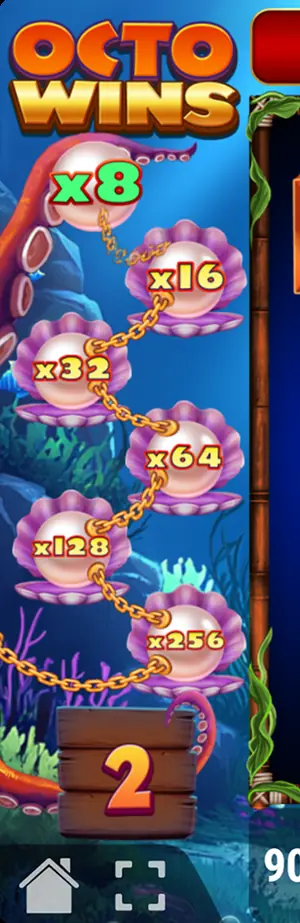
The ladder runs up the left of the reel frame: a chain with a shell on it every so often and a pearl lying open in each shell, carrying a value. The values are doublings. Reading across the captures this site holds, the legible steps are x1, x2, x4, x8, x16, x32, x64, x128, x256, x512 and x1024 — and the top of the chain is not a doubling at all, because the largest value appears on several shells in a row instead of doubling once more. The climb is designed to slow down at the top rather than run away from itself.
Pateplay describes the ladder as rising from a doubling at the bottom to the game's ceiling, which is a sentence that compresses two different things. 5,000x the stake is the most the game will return on a round; the ladder is a mechanism for making a round big enough to approach that. The largest value legible on a pearl is a long way below the ceiling, and the two should not be confused — the ceiling is reached by a chain of cascades multiplied at the height the ladder has reached, not by landing one enormous pearl.
Separately from the ladder there are pearl symbols that land on the reels themselves. The studio's own account of them is that they turn up at random during ordinary play and during the bonus round alike, and that each takes a value drawn at random within a published range. Both the listing that covers the game and the review that covers it call these "pearl multipliers", and both treat them as one of the two things worth knowing about the title. They are the reason the ladder is not the only source of a multiplier on the screen.
The wild is an octopus in a gilt frame with the word printed across the bottom of it, and it has an unusual rule attached: Pateplay states that it appears on a reel only after a cascade has paid. It cannot be part of the screen a spin opens with. That is a genuine design decision rather than a technicality, because it means the wild can only ever extend a chain that is already running — it never starts one.
What it substitutes for is everything except the scatter. The boat that opens the bonus round is the one thing the octopus will not stand in for, which is the usual arrangement and the reason the bonus round cannot be forced by a lucky wild. The frame around the symbol is there to make it readable at a glance on a screen where the ordinary octopus artwork is also part of the background, and on the narrow layout it is the only framed thing on the grid.

In the bottom corner of the screen there are two buttons that cost money, and they do opposite things. One of them buys an outcome. The other buys a probability.
The toggle is the probability. On the captured screen it is labelled with its own name and priced in money rather than as a multiple — 75.00 against a stake of 50.00, which is half the stake again added to every spin for as long as the tick is set. It has a cross and a tick beside it, so its state is visible before a spin starts rather than buried in a settings panel. What it improves is the chance of the bonus round arriving on its own. The studio's catalogue names more than one control of this kind for the game, at different prices and aimed at different things, so the sensible thing for a reader is to take the price and the promise off the panel in front of them rather than from any list — including this one.
The purchase is the outcome. Pressing it opens a panel with things for sale on it, a stake selector and a price that moves with the stake, and buying one starts the bought round immediately. The bonus round page takes that panel apart, because it is the place where the published descriptions of this game stop agreeing with one another and the disagreement is worth setting out properly rather than in a sentence.
Four coloured counters run across the top of the screen, above the reel frame, each with its own amount ticking in it. The two largest are an order of magnitude apart from the two smallest, which is the shape a tiered jackpot always has. The studio files OctoWins under one of its jackpot series, and the listing that reproduces the full specification says the game is connected to a four-level jackpot and carries a mystery cash feature alongside it.

So they are real and they are part of the product. What they are not is a number this site can tell anybody. A progressive meter belongs to the pool an operator runs it on; it rises with everybody staking into that pool and resets when somebody takes it. The figures legible on the captures are whatever the pool happened to be standing at on the day the screens were taken, and reprinting them as though they were a property of the game would be the most misleading thing on this site.
There is one more name in the studio's own list of this game's parts that deserves a mention precisely because it cannot be explained: a "coin pile", with one of the priced toggles said to improve the chance of it. No capture this site holds shows one. It is written down here because the studio wrote it down, and it is left unexplained here because the alternative would be filling the gap with a guess about how it connects to the meters above.
Put end to end, a round in this game reads like this. A stake is set. If the toggle is ticked, the stake is larger than the number on the button by the share named above, and the bonus round is correspondingly more likely. Fifteen symbols land. If nothing pays, the round is over and none of the apparatus moved. If something pays, it is settled and deleted, the gaps fill, the counter in the wooden box goes to one, the ladder takes a step, and the refilled screen is read again — possibly with a wild in it now, which was not possible a moment ago.
Each further cascade repeats that. The counter rises, the ladder rises with it, and any pearl symbol that lands along the way adds a value of its own. The chain ends on the first screen that pays nothing, and the round is settled at whatever height the ladder reached. If enough boats landed somewhere in the chain, the bonus round opens next instead of the round simply ending — and it keeps the cascade and the pearls, which is why a bonus round in this game is the same machinery with the stake removed rather than a different game bolted on.
Each answer below is the one carried in this page's structured data, word for word.
Any paid combination. The symbols that formed it leave, the gaps refill from above and the new screen is read again from the left, until a screen pays nothing.
Pateplay states that it arrives on a reel only after a cascade has already paid, and that it stands in for everything except the scatter.
The legible steps on the captured screens are x1, x2, x4, x8, x16, x32, x64, x128, x256, x512 and x1024, in doublings, with the top value repeated rather than doubled again.
A better chance at the bonus round, for half the stake again on every spin. The panel shows the cost in money against the stake currently selected.
No. The toggle changes the odds of the round opening by itself; the purchase opens one immediately for a fixed price. They sit on the screen as separate controls.
Four jackpot meters. They belong to the pool the operator runs, not to the game, and nothing here can say what they will show anywhere in particular.